Thursday, February 12, 2026
Jackie Riddel
To maximize a "Think Day," you need more than just a task list; you need a way to clear the "mental clutter" so you can actually access your higher-level creativity. David Allen often refers to this as achieving a "Mind Like Water."
While there isn't one single video titled "Think Day," the following video from David Allen’s official channel is the perfect guide. It covers the "Horizons of Focus," which is the exact GTD framework designed for deep, strategic thinking.
The Best Video for Your Think Day
David Allen - Getting Things Done (Zions Bank Webinar)
-
Why it works: This is a comprehensive 58-minute deep dive where David explains the Six Horizons of Focus. This is the framework you should use during a Think Day to move from "What do I need to do today?" to "What is my purpose for the next 5 years?"
-
Key Section: Skip to the part where he discusses "Perspective" and the "Higher Horizons" (around the middle of the video). It provides the trigger questions you need to prompt deep reflection.
🧠 The GTD Think Day Strategy Guide
Framework: The Horizons of Focus & Natural Planning
Part 1: The Mind Sweep (The "Pre-Think" Clearance)
Before you can think about the future, you must empty the present. Spend 20 minutes writing down every "open loop" (projects, chores, ideas, worries) until your brain feels quiet.
The Goal: Achieving "Mind Like Water." If it’s on your mind, it’s not in your system.
Part 2: The 6 Horizons of Focus
Use these prompts to guide your deep-thinking blocks. Spend 30–45 minutes per horizon.
| Altitude |
Focus |
Think Day Reflection Prompts |
| 5: Purpose |
Core Intent |
Why am I doing what I'm doing? Does my current path align with my deepest values? |
| 4: Vision |
3–5 Years |
If I had unlimited resources, where would I be in 2030? What does "wild success" look like? |
| 3: Goals |
1–2 Years |
What major milestones must I hit in the next 24 months to make my 5-year vision a reality? |
| 2: Areas of Focus |
Roles & Responsibility |
How is my "maintenance" in key areas: Health, Wealth, Relationships, and Personal Growth? |
| 1: Projects |
Current Commitments |
What projects am I currently committed to that don't serve any of the higher horizons? (The "Delete" List). |
| Ground |
Next Actions |
What is the very next physical step for my most important "Horizon 3" goal? |
Part 3: The Natural Planning Model (NPM)
Use this for one specific big idea or project that surfaced during your Think Day.
-
Define Purpose/Principles: Why are we doing this? What are the boundaries?
-
Outcome Visioning: What does the final result look and feel like?
-
Brainstorming: (Mind Map) What are all the pieces, parts, and ideas?
-
Organizing: What are the categories? What comes first?
-
Identify Next Actions: What is the 2-minute task that gets this moving?
💡 Think Day Tips
-
Go Analog: Use a physical notebook or whiteboard to avoid digital distractions.
-
The "Someday/Maybe" Audit: Review your old ideas. Which ones are you finally ready to kill so they stop taking up mental space?
-
Change Scenery: If possible, do this outside your usual office or home environment.
1. The Best "Why & Logic" Summary (by David Allen)
Getting in Control and Creating Space | TEDxAmsterdam
-
Length: 18 Minutes
-
The Vibe: High-level, philosophical, and motivating.
-
Why it’s the best: This is David Allen’s most famous talk. He doesn’t just list the steps; he explains why your brain is terrible at holding ideas and how clearing that space allows for creativity. It’s the perfect "mental reset" to watch before starting a Think Day.
2. The Best "Mechanical" Summary (Animated)
Getting Things Done (GTD) by David Allen - Animated Book Summary
-
Length: 8 Minutes (by Productivity Game)
-
The Vibe: Fast-paced, visual, and highly practical.
-
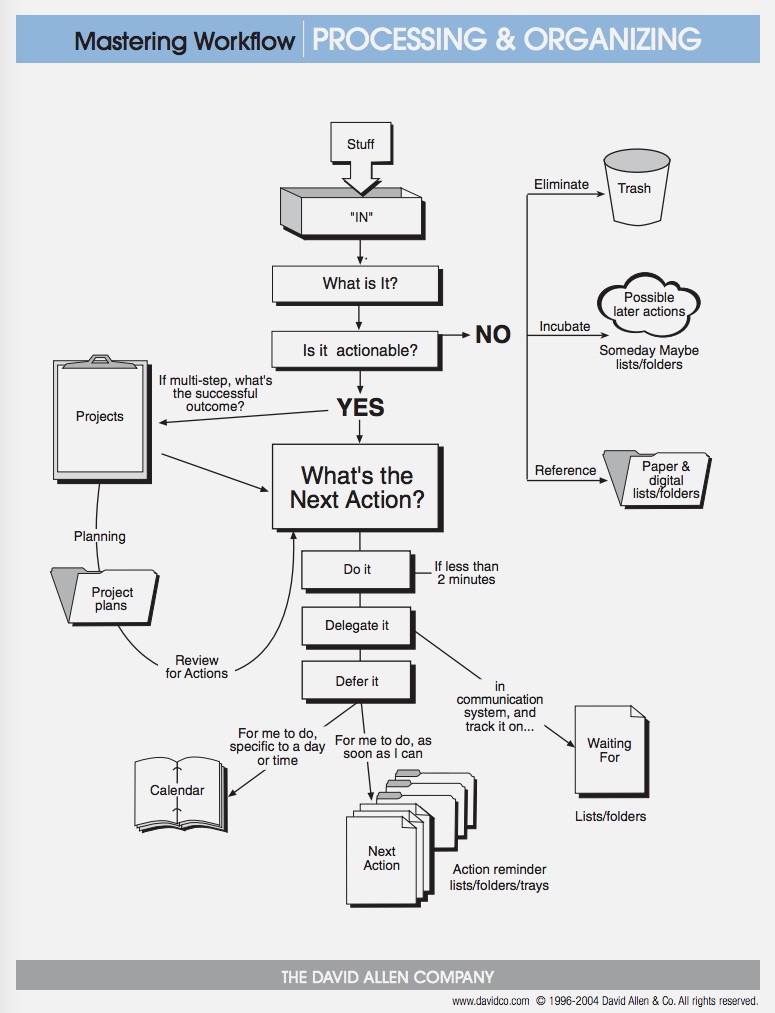
Why it’s the best: If you want to see exactly how the "Capture, Clarify, Organize, Reflect, Engage" workflow looks in practice, this video animates the flowchart. It’s the quickest way to memorize the "2-minute rule" and the difference between a "Project" and a "Next Action."