

-
Articles

- Support Topic Items
Form & Jotform Guidelines
- Details
- Tori Schippers
We are happy to assist with creating online forms for your parish or school. To help ensure a smooth and timely process, please review the following guidelines before submitting your request.
What Solutio Software Will Do
As part of your website support, Solutio Software is happy to:
- Convert an existing PDF or paper form into an online form or fillable PDF.
- Create an online form from a complete list of questions provided by your organization.
- Embed the completed form onto your website.
- Configure email notifications to the designated recipient(s).
- Test the form before it is published to ensure it is functioning properly.
- Provide basic guidance on using Jotform and making simple updates.
What We Need From You
1. Form Content
Solutio Software can help bring your form online, but we do not create forms from scratch.
To begin, please provide one of the following:
- An existing PDF or paper form that can be converted, or
- A complete list of all questions, fields, and instructions you would like included.
Please review your content before submitting it, as incomplete forms may delay the project.
2. Jotform Accounts
If you expect to make regular changes to your form, we strongly recommend creating your own Jotform account.
Having your own account allows you to:
- Update questions and wording whenever needed.
- Add or remove fields.
- Modify notifications and settings.
- Manage submissions directly.
Jotform offers nonprofit plans for many churches and nonprofit organizations, making it an excellent option for organizations that anticipate ongoing changes.
3. Submission Email Address
Please include the email address (or addresses) that should receive completed form submissions.
We cannot complete the setup until this information has been provided.
4. Dated Documents
If you are submitting a document to be converted into a fillable PDF or online form, please remove any dates before sending it to us.
Removing dates allows the form to be reused year after year without requiring annual redesigns.
5. Sensitive Information
For security purposes, forms requesting highly sensitive information—including but not limited to:
- Social Security Numbers
- Banking information
- Credit card information
- Driver's license numbers
- Other confidential personal data
will not be created as online forms by Solutio Software.
We are happy to convert these documents into fillable PDFs so they may be completed electronically and submitted through your preferred secure method.
6. Payment Forms
If your form requires collecting online payments, we strongly recommend using your own Jotform account.
While Solutio Software is happy to help configure the payment integration and embed the completed form on your website, we do not maintain or manage payment processors, merchant accounts, API keys, or other sensitive financial credentials.
Using your own account allows your organization to:
- Maintain ownership of your payment settings.
- Update payment amounts and options as needed.
- Manage merchant account information securely.
- Receive payment notifications directly.
- Keep sensitive financial information within your organization.
Questions?
If you are unsure whether your form should be an online form or a fillable PDF, or if you have questions about Jotform, please contact us before getting started. We are always happy to recommend the best solution for your parish or school.
Connecting Elfsight Widget to Facebook
- Details
- Jackie Riddel
Connect Your Facebook to Website Widget
To connect the Facebook widget on your homepage to your Facebook account, we will need to:
- Schedule a meeting below with Dakota or Jeremy
- Connect to your computer using Chrome remote desktop. https://remotedesktop.google.com/support/----
you will need the download from the link above - Open up a browser where you are logged into Facebook
- Open up another browser tab and Solutio will log into our Elfsight account.
- Solutio will then click through the settings to connect the widget to your Facebook page.
- Solutio will log out of our Elfsight account.
- We'll disconnect the chrome remote desktop and conclude the call.
Schedule a Meeting
To connect your Facebook account to the widget on your website, please schedule a meeting with Dakota or Jeremy for a day and time that works best for you.
Too Many Requests Error
- Details
- Jeremy Meyer
If you make more than 7 unique requests (excluding homepages) within a 5 second window to the front-end (opening 7 or more links super fast). That triggers throttling because it's a common tactic of bots to just start crawling different URLs of the site, and different URLs would have an inactive page cache, causing full renders, causing higher load on the server.
Once you are flagged by portas as having bot-like behavior, your requests are throttled for the following 2 minutes.
PCI or DSS Compliances
- Details
- Tori Schippers
Updated 6.16.2026
If a client has a giving page that links externally, great. We are off the hook.
If a client has an embedded giving page, we have to do more.
#2 below is required if: the client has a payment system that is hosted externally, but uses a pop-up and stays on the same domain (as Al noted in this case).
What You Must Do
1. Verify Your Provider: Ensure your giving platform (e.g., Stripe, PayPal, or Blackbaud) is a PCI DSS validated service provider.
2. Inventory Scripts: Under PCI 4.0, you must maintain a written list of every script running on the page where the "Give" button/popup lives and justify why each script is there.
3. Use HTTPS: Your entire website, especially the page launching the popup, must be served over HTTPS.
4. Complete Your SAQ: You are still required to fill out an annual Self-Assessment Questionnaire (SAQ) (typically SAQ A) to maintain official compliance status.
Thus the spreadsheet of scripts.
My understanding is that The Self-Assessment Questionnaire (SAQ) is ALWAYS the merchant's responsibility, or your responsibiliy in this case.
(actual sheet: https://docs.google.com/spreadsheets/d/1eWXef5m5jAGiM1y3dq0THwkYPsybOiMnkNWYpey-Rjw/edit?gid=1090969581#gid=1090969581 )
Solutio Software does not:
- Accept payments
- Process payments
- Transmit cardholder data
- Store cardholder data
- Provide payment forms, shopping carts, or checkout pages
Therefore:
- Solutio Software is NOT required to be PCI-DSS compliant
- Solutio is not a payment service provider
- PCI responsibility lies solely with the third-party payment processor
Here is a Vanco questionaire about DCI compliance February 20206 via StM-Man
PCI Compliance Questions-Vanco.pdf
-------------------------------------------------
Hello,
Solutio Software provides website hosting and content management services only. We do not accept, process, transmit, or store credit card or payment data.
In some cases, Solutio-hosted websites may embed third-party, externally hosted payment forms (such as via iframe or script) that are provided and fully controlled by the payment processor. Solutio Software does not develop, modify, or maintain these forms and has no ability to access, intercept, view, or store cardholder data entered into them.
All payment data is submitted directly from the end user to the third-party payment processor’s systems. Solutio Software does not participate in the payment transaction and does not handle cardholder data in any capacity.
As a result, Solutio Software is not within PCI-DSS scope and is not required to maintain PCI-DSS compliance. PCI-DSS obligations apply to the organization accepting payments and the third-party payment processor.
Please let us know if additional clarification is required.
Google Workspace 2 step issues
- Details
- Jeremy Meyer
Google workspace is starting to require all workspace administrator accounts and Google cloud accounts to activate 2 Step authentication. The problem is that if these settings are not allowed then users can't set it up on their own. If a workspace account does not have 2 step set up already or our workspace admin account is locked out this is likely the issue.
If you are unable to login to google workspace because its already locked out you will need to fill out this form for the account and request an extension to the 2SV enforcement date. After Google lets you back in be sure to set up these settings and activate 2-step on the account so we don't get locked out again.
https://toolbox.googleapps.com/apps/recovery/form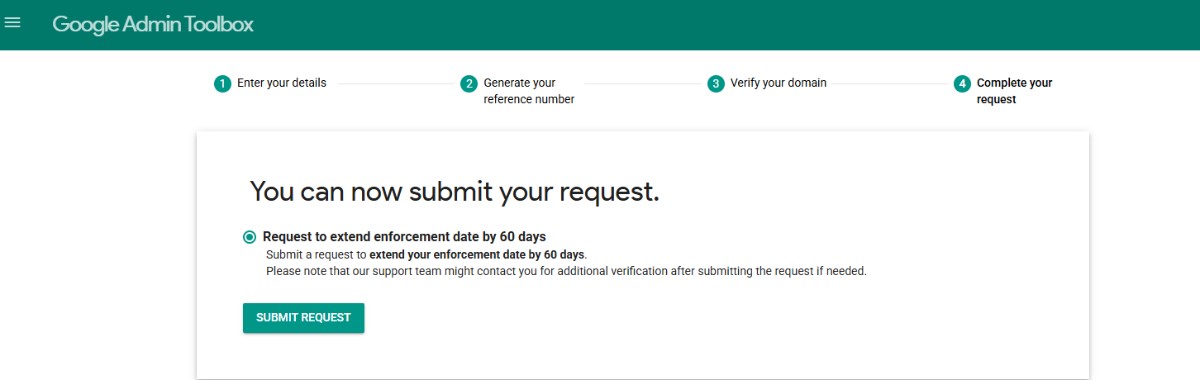
Updated settings in google workspace.
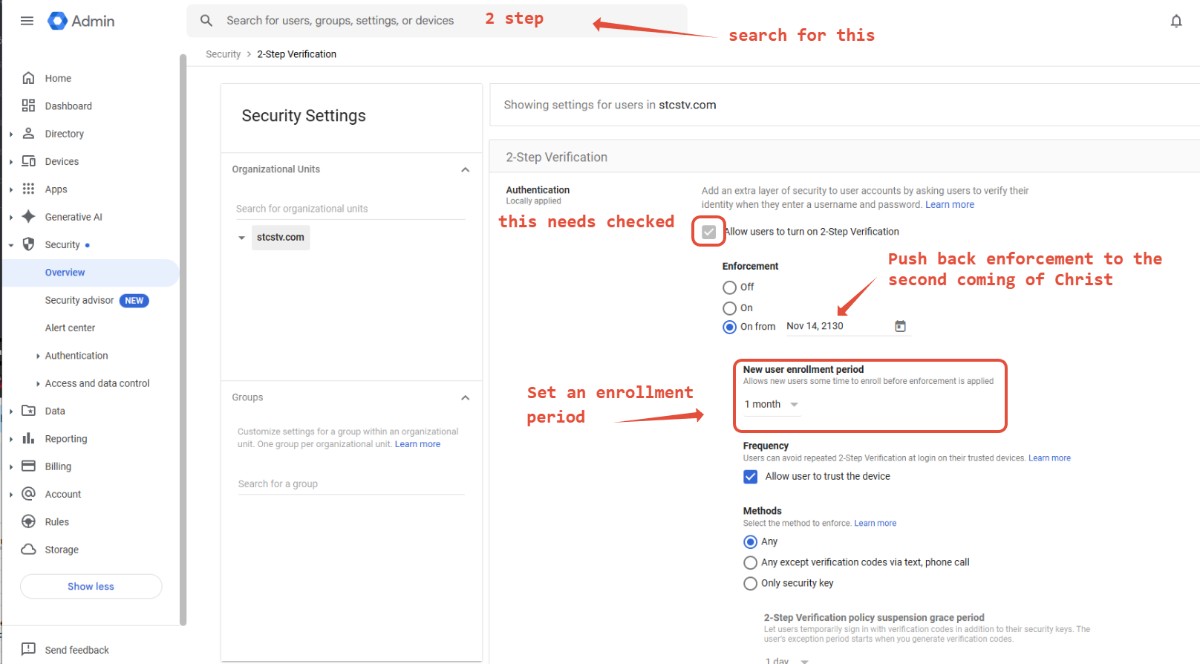
Don't forget to save these:
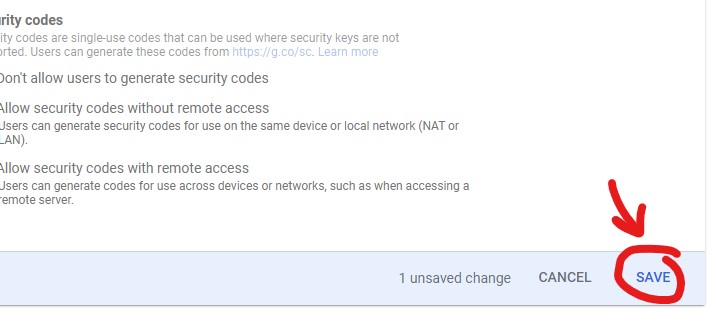
After those settings are set up the next time you sign into the account it should request you to set up 2 Step verification. Make sure to do that.
Emailing support issues to Alex
- Details
- Jeremy Meyer
Protocol for sending Network support issues
- retrieve the client's IP address
- find out if the client can access the website via CODE.solutiosoftware.com
- have the client try the issue outside of the parish/school network (there are times when a parish will mess up their internal network by overriding the Internet's DNS with custom values on their internal router)
- gather a screenshot from the client, if possible (these can reveal a lot about their setup more than words a lot of times)
- send Alex an email with subject: Network - SITECODE
Protocol for DNS change requests
- first check to see if Solutio controls the DNS servers (i.e.., the Domain Manager lists Solutio by the DNS field)
- when a DNS record change is needed send Alex an email (instead of Freshdesk/Discord)
- subject: DNS - SITECODE - DOMAIN
- body: the record type, host, and value in plain text (instead of images he has to re-type or extract from documents)
LPI Bulletin Widget
- Details
- Tori Schippers
Hi xxxxxxxxx
Ultimately the decision is up to you, but I want to show you the bulletin widget we generate as well as what LPI's widget looks like and how they each function.
Solutios' Widget: xxxxxxxxxx. With this, when you click on a bulletin, it immediately opens up into a new tab to view/download the bulletin and you can scroll down to view all of the advertisers.
LPI's Widget: xxxxxxxxxxxxx. With this, clicking on a bulletin takes you to LPI's website, where you can then click on a bulletin to view/download it and also scroll to the bottom of the PDF to view the advertisers.
The biggest difference between the two is that we aim to limit the amount of clicks required to view/download the bulletin. However, your advertisers for the bulletin still get the same amount of exposure.
Let me know if you have any questions, or what your thoughts are regarding the two options!
Migrating Recaptcha Classic to new ReCaptcha in the Google Cloud Console
- Details
- Jeremy Meyer
Google is sunsetting our current method for creating and managing reCAPTCHA keys. They will be managed via the Google cloud console after 2025
Setting up email forwarding with google workspace
- Details
- Jeremy Meyer
If clients want to have emails sent to one email forwarded automatically to another email you can use google workspace to set up email forwarding.