-
Articles

- Page Content (Menu Item Needed)
Studius Templates
- Details
- Jeremy Meyer
Youtube Playlist
- Details
- Al Jirak
This still needs some work and could be transitioned into something that could be more universal. I just did this quick for Res-Farm and thought it could be useful in the future.
-
 Take a Step! Transitional Deacons Discuss What to Do if You Are Thinking About Becoming A Priest
 -
 Seminary Life Discussed by DRVC Transitional Deacons
 -
 Excitement for Priesthood
 -
 Gifts & Charisms of Priesthood
 -
 Fr. Michael Duffy Welcomes All to Cathedral for Ordination; Discusses its beauty and significance.
<link rel="stylesheet" href="https://cdnjs.cloudflare.com/ajax/libs/twitter-bootstrap/4.0.0-alpha.4/css/bootstrap.min.css"/>
<style type="text/css">
body{
background: #ddd;
}
.head{
margin-top:20px;
margin-bottom: 20px;
font-weight: bold;
text-align: center;
}
.container{
margin-top:40px;
}
.thumb{
width:100%;
min-height: 90px;
}
.list{
list-style-type: none;
padding:0px;
}
.list li{
cursor: pointer;
background: #222;
margin-bottom: 10px;
padding-left: 10px;
padding-top: 5px;
padding-bottom: 1px;
font-weight: bold;
font-size:15px;
min-height: 60px;
color: white;
transition: all .5s ease-in-out;
}
.list li:hover{
background: #404040;
color: white;
}
.wrapper .col{
height: 325px;
overflow: auto;
padding:5px;
}
.wrapper{
background: #222;
}
.list-wrapper{
overflow-x: hidden!important;
background: #222;
}
.title{
padding-top:20px;
}
.withpics .item.active{
background: #404040;
color: white;
}
::-webkit-scrollbar {
width: 8px;
}
::-webkit-scrollbar-track {
box-shadow: inset 0 0 5px grey;
border-radius: 10px;
}
::-webkit-scrollbar-thumb {
background: #000;
border-radius: 10px;
}
.withpics img { float: left; width: 72px; height: 50px; margin-right: 10px; }
.row.wrapper { display: flex; }
.col.col-md-5.list-wrapper { width: 350px;}
.col.col-md-7 { flex: 1; }
.withpics .item p { font-size: 0.7rem;}
@media only screen and (max-width: 767px) {
.row.wrapper { display: block; }
.col.col-md-5.list-wrapper { width: 100%;}
}
</style>
<div class="container">
<div class="row wrapper">
<div class="col col-md-7">
<iframe id="video-embed" width="100%" height="315" src="https://www.youtube.com/embed/hZW8b_2dqbg" frameborder="0"></iframe>
</div>
<div class="col col-md-5 list-wrapper">
<ul class="list withpics">
<li class="item active" id="hZW8b_2dqbg" onclick="playVideo('hZW8b_2dqbg')"><p><img src="https://img.youtube.com/vi/hZW8b_2dqbg/default.jpg">Take a Step! Transitional Deacons Discuss What to Do if You Are Thinking About Becoming A Priest</p></li>
<li class="item" id="wr6r9cQmEuE" onclick="playVideo('wr6r9cQmEuE')"><p><img src="https://img.youtube.com/vi/wr6r9cQmEuE/default.jpg">Seminary Life Discussed by DRVC Transitional Deacons</p></li>
<li class="item" id="7kDNr4wu6OE" onclick="playVideo('7kDNr4wu6OE')"><p><img src="https://img.youtube.com/vi/7kDNr4wu6OE/default.jpg">Excitement for Priesthood</p></li>
<li class="item" id="jqgKztnmeiw" onclick="playVideo('jqgKztnmeiw')"><p><img src="https://img.youtube.com/vi/jqgKztnmeiw/default.jpg">Gifts & Charisms of Priesthood</p></li>
<li class="item" id="0H9m0gHzbAA" onclick="playVideo('0H9m0gHzbAA')"><p><img src="https://img.youtube.com/vi/0H9m0gHzbAA/default.jpg">Fr. Michael Duffy Welcomes All to Cathedral for Ordination; Discusses its beauty and significance.</p></li>
</ul>
</div>
</div>
</div>
<script type="text/javascript">
document.getElementsByClassName('item')[0].classList.add('active');
function playVideo(id){
items = document.getElementsByClassName('item');
for(i=0;i<items.length;i++){
items[i].classList.remove("active");
}
document.getElementById(id).classList.add('active');
src = 'https://www.youtube.com/embed/'+id;
document.getElementById('video-embed').setAttribute('src',src);
}
</script>
Setup & Defaults
- Details
- Tori Schippers
New Consultation Emails
- Details
- Jackie Riddel

New Website Project - Intro Email
Hello XXXX,
Christ's peace be with you! My name is xxxxxxx with Solutio and I am reaching out today to find a date to visit about the new website for XXXX. Jacob let me know that we will be working with you to get this website project kicked off. The first step is to have a "Consultation Meeting" to determine some of the big decisions. It usually takes an hour for this online meeting and it is fine to have other people join in the discussion.
Please visit xxxxxxxxxxxxxx to review my availability and schedule a time that works for us to connect. I look forward to talking and getting started on your new website!
In Christ,
--------------------------------------------------------------------------------------------------------------
New Website Consultation Prep
Hello XXXX,
Thank you for scheduling a time for us to connect.
To get ready for our meeting, please take a few minutes and fill out our Style Quiz(es) and take a look at some of our most recent work. This will give us some ideas about the style of website you are looking for.
Parish Style Quiz: https://form.jotform.
School Style Quiz: https://form.jotform.
Business/Organization Style Quiz: https://form.jotform.
Recent work: https://www.solutiocloud.us/
This particular meeting is online and we usually use a conference website (details below) to connect. If possible, please secure a laptop that everyone can gather around for the call. Most have a built-in microphone and camera to make it easier to communicate. Otherwise, we can connect over a speakerphone (number below) and then we can share our screen with your computer.
==============================
To join the video meeting, click this link: https://meet.google.com/gvu-
Otherwise, to join by phone, dial +1 617-675-4444 and enter this PIN: 842 789 824 8476#
To view more phone numbers, click this link: https://tel.meet/gvu-ggxq-kux?
==============================
I look forward to getting this project kicked off!
--------------------------------------------------------------------------------------------------------------
Post Consultation Email Followup (New Site)
Subject Line: Getting Started - DOMAINNAMEHERE
Hello XXXXXXXXXX,
Thank you for your time XXXXXX. It was great to connect with you about XXXXXXX and we are excited to start building your site. Here is a link to our project status page. (we update this on Mondays, typically)
WEBSTRUCTURELINK
List of items to send:
- XXXXXXXXXXX
- a draft of the menu structure you have in mind for the website
Pictures or other files can be submitted to dropbox via the project status link above. Dropbox request only permits uploading one file at a time, but multiple files can be submitted together in a zip file folder
What we are looking for are artistic pictures in and around the church. We only need a few, but it is nice to have 100 or more to sort through if possible. Pictures with people in them are good too, to give a better sense of the community. Here is a link to a sample gallery.
I/Joel will follow up with XXXXX about the domain.
I will email XXXXXX directions for the Google Apps application.
Here is our anticipated timeline for this project:
- content conversation in xxxxxx weeks
- pictures received by xxxxxxx
- prototype created by xxxxxxx
- create and build during the xxxxxxxxxxxxxx
- training and launch by around xxxxxxxxxx
If you have any questions, please ask. Have a blessed rest of your week.
In Christ through Mary,
--------------------------------------------------------------------------------------------------------------
Redesign Emails
Redesign Pre-Consultation (to schedule) Email
Subject: DOMAINNAMEHERE -- WEBSITE PROJECT
Dear XXXXX,
I was excited to hear from Travis that we are going to be working on a redesign for XXXXXX. When would be a good time to visit about this via a webinar? Will anyone else be involved in the process? I imagine it will take about an hour to go through the main decisions. Please visit XXXXXXXXXXX to review my availability and schedule a time that works for us to connect.
We have created a styles guide quiz to help you think through the elements of the site to consider when choosing a new template: https://goo.gl/
Also, if you get some time you can start looking through some our most recent designs at this link: http://bit.ly/3qPmCo5.
I look forward to hearing back from you. Let me know if you have any questions. Have an awesome day!
In Christ through Mary,
--------------------------------------------------------------------------------------------------------------
Post Redesign Consultation Email Follow-up
Subject: DOMAINNAMEHERE -- WEBSITE PROJECT
Hello XXXXXXX,
Thank you for your time this morning to discuss the details of redesigning DOMAINHERE. Here is a link to our project status page where you can upload images/files and check the progress of the project.
WEBSTRUCTURELINK
Pictures or other files can be submitted to dropbox via the link above. Dropbox request only permits uploading one file at a time, but multiple files can be submitted together in a zip file folder.
Here is our anticipated timeline for this project:
- content conversation in xxxxxx
- pictures received by xxxxxx
- prototype created by xxxxxx
- create and build in xxxxxx
- (training) and launch by in xxxxxx
If you have any questions, please ask.
In Christ through Mary,
Timeline
- Details
- Jackie Riddel
this is the gantry 5 particle meant to replace rokminicalendar.
Closing Out A Project
- Details
- Jackie Riddel
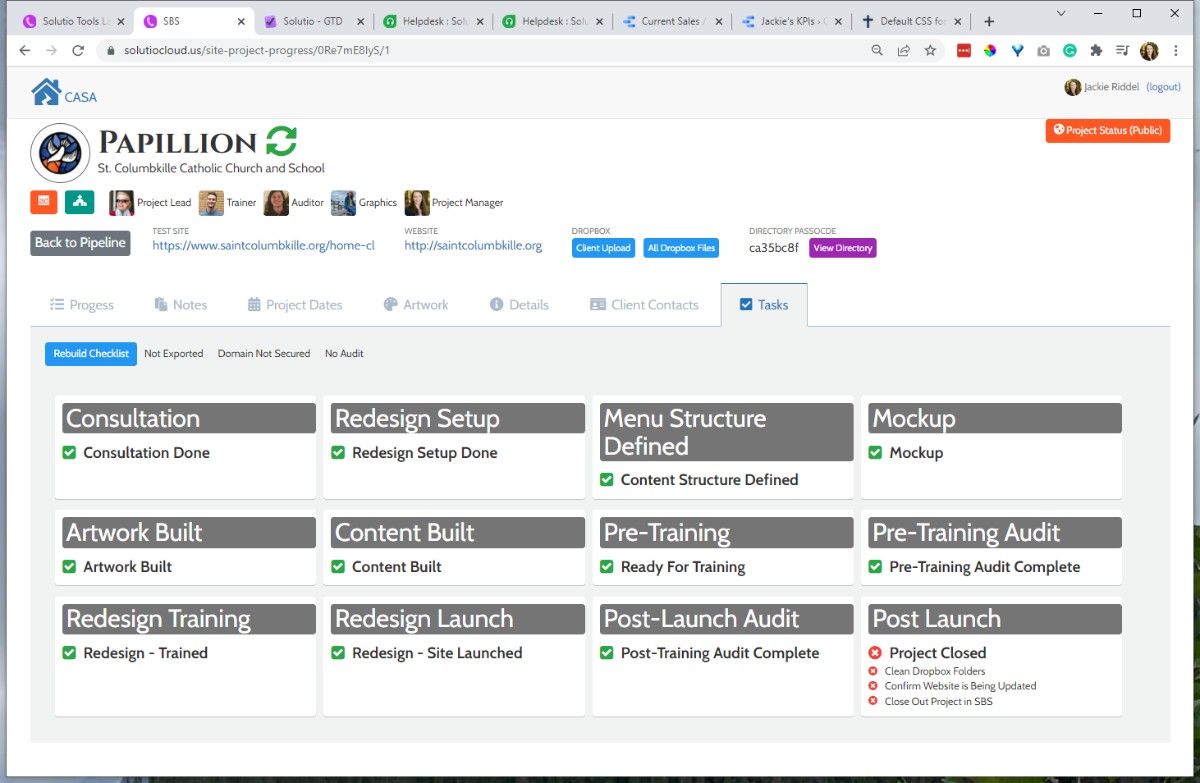
- Training or follow-up training is complete or not needed
- Site or redesign is launched.
- The audit is complete.
- Double-check the website to make sure updates are being made by the client (a bulletin upload at minimum)
- Make sure remaining scrum points are set to 0.
- Set Project Phase to Finished in the Details tab.
- Can move Client folder from Working Sites to Archive Sites in Content Dropbox (or leave for Jackie to complete)
Redesign Setup Checklist
- Details
- Jackie Riddel

-
-
1. Install Template
As of June 4, 2024, Alex will import a copy of the Clarity template as it is in the Master Clone in Forge for redesigns.
-
2. Site Assets in Page Settings
These should be imported along with the template 6.4.2024.
- Assets
- Visit https://styles.solutiosoftware.com/other-effects/default-css-for-editor to see the most recent list of assets to add -- if it does not match what is below
8.14.20
Fav: gantry-media://template/favicon.png
Touch: gantry-media://template/apple-touch.pngUPDATED 2.24.22 : https://shared.solutiocdn.com/content/shared/ ...
content/override.css priority 1
//shared.solutiocdn.com/content/shared/fonts.css priority 2
//shared.solutiocdn.com/content/shared/clarity2.css priority 5
//shared.solutiocdn.com/content/shared/particle.css priority 6
//shared.solutiocdn.com/content/shared/sponsorship.css priority 10 (only if sponsorship)
//shared.solutiocdn.com/content/shared/base2.css priority 10Before June 2022
//shared.solutiocdn.com/content/shared/base.css priority 10
//shared.solutiocdn.com/content/shared/sprocket.css priority 6Javascript
//shared.solutiocdn.com/content/shared/particle.js
//www.solutiocloud.us/js/directory.js (only if sponsorship) - Recommend checking the most recently launched site to check and compare --- be careful not to confuse the two sites and make edits to the already launched site.
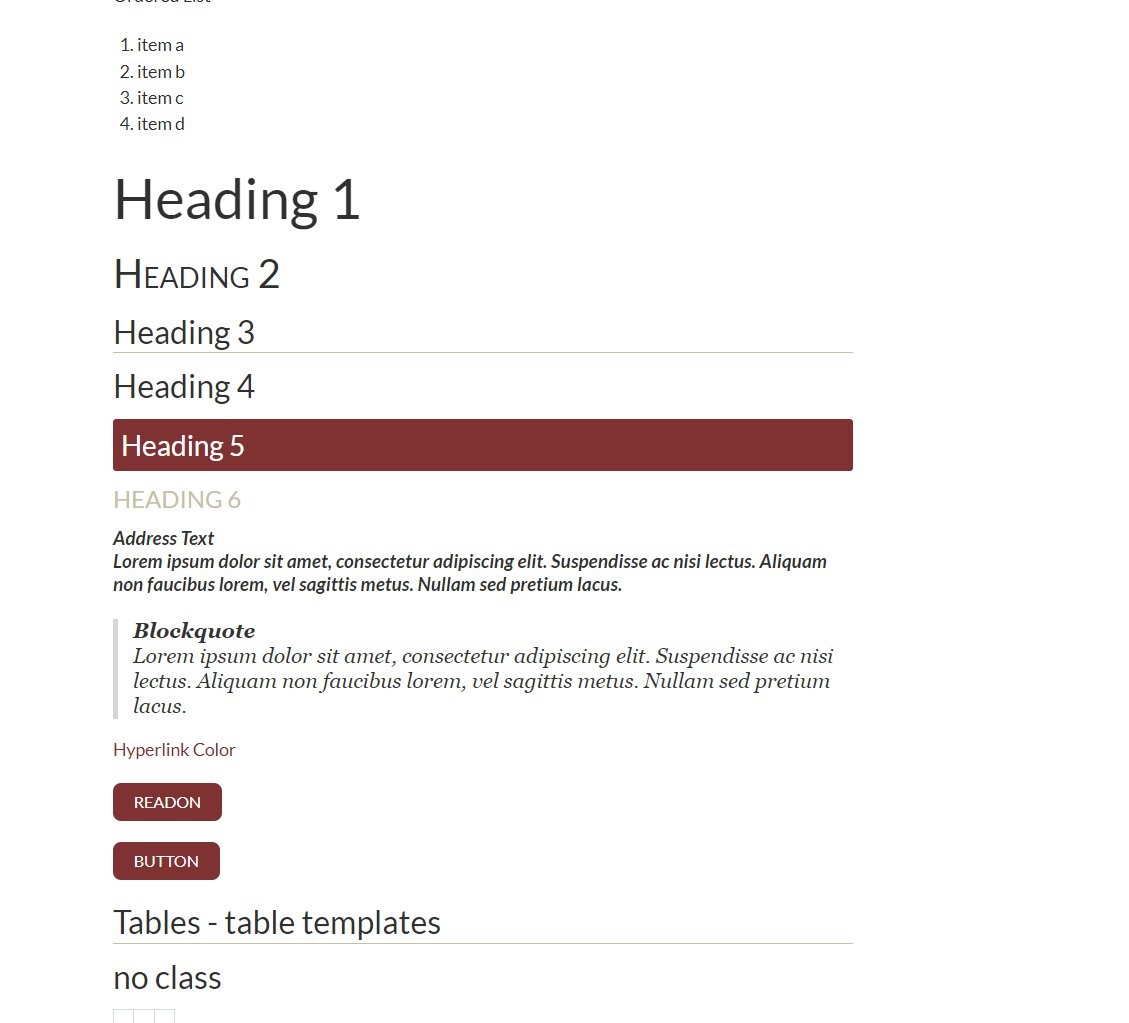
- Visit /styles on the site to see if /fonts.css is working. Heading 5 should have a background like screenshot. If not something is wrong with the asset (i.e. wrong URL or space at the end of the file path)
- Visit https://styles.solutiosoftware.com/other-effects/default-css-for-editor to see the most recent list of assets to add -- if it does not match what is below
- Assets
-
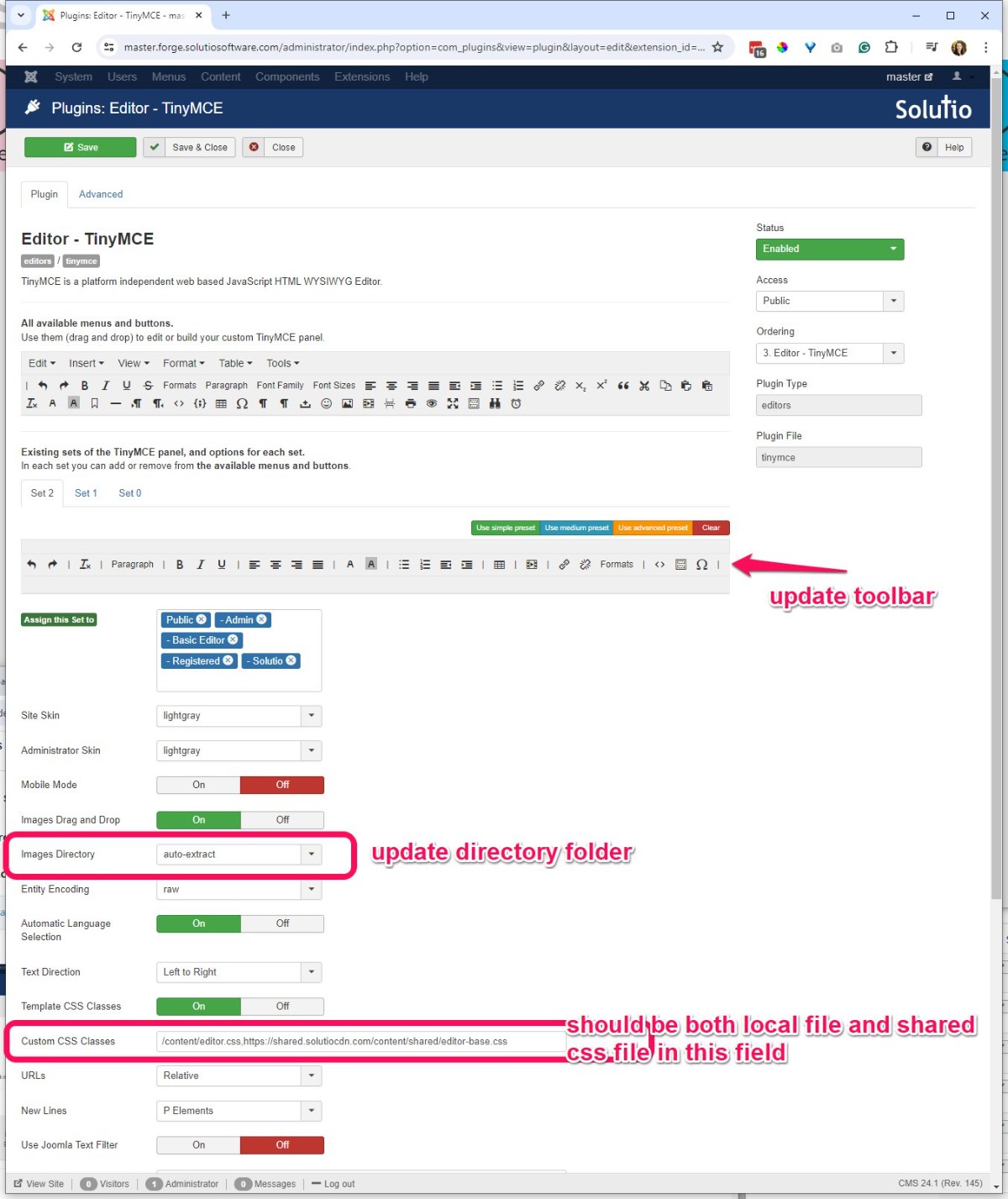
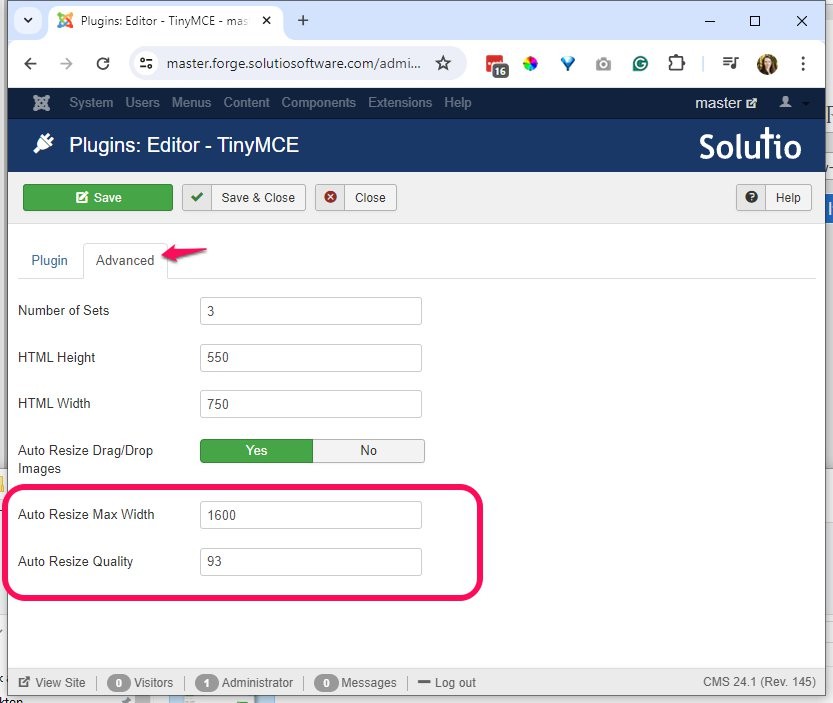
3. Tiny MCE Editor editor.css setting
Visit Tiny MCE Editor from the control panel -- update the tool bar to match Manual Version 3.8 - check the custom CSS Classes for the editor.css files
-
Default editor.css and shared editor.css
/content/editor.css,https://shared.solutiocdn.com/content/shared/editor-base.css
-
-
4. Replace PNGs with SVG icons on the Control Panel
See SVG import instructions / video
https://sop.solutiosoftware.com/defaults-setup/svg-control-panel
-
5. Create New Menu Sets (redesigns only)
Create New Menu Sets (Only applies to redesigns, not new sites)
- CL Main Menu
- CL Hidden Menu
- CL Secondary Menu
What are the New categories??
-
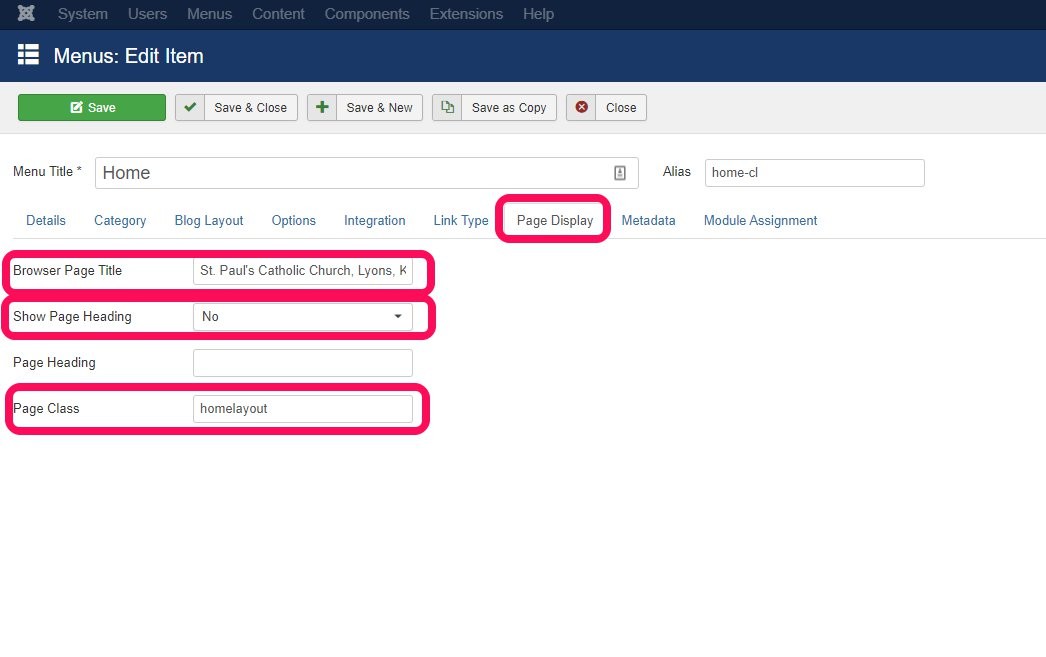
6. Page Title is not Home
(this will be complete already if new menu set copied the Home menu item in redesigns)
- On the home-cl menu item, visit the page display tab
- Updated the Browser Page Title, be sure to include city and state. Can likely copy from the existing home menu item
- Show Page Heading set to No or Use Global
- Page Class = homelayout
-
7. Activate Side Menu Module
- If not launched yet, copy existing Side Menu for Main Menu
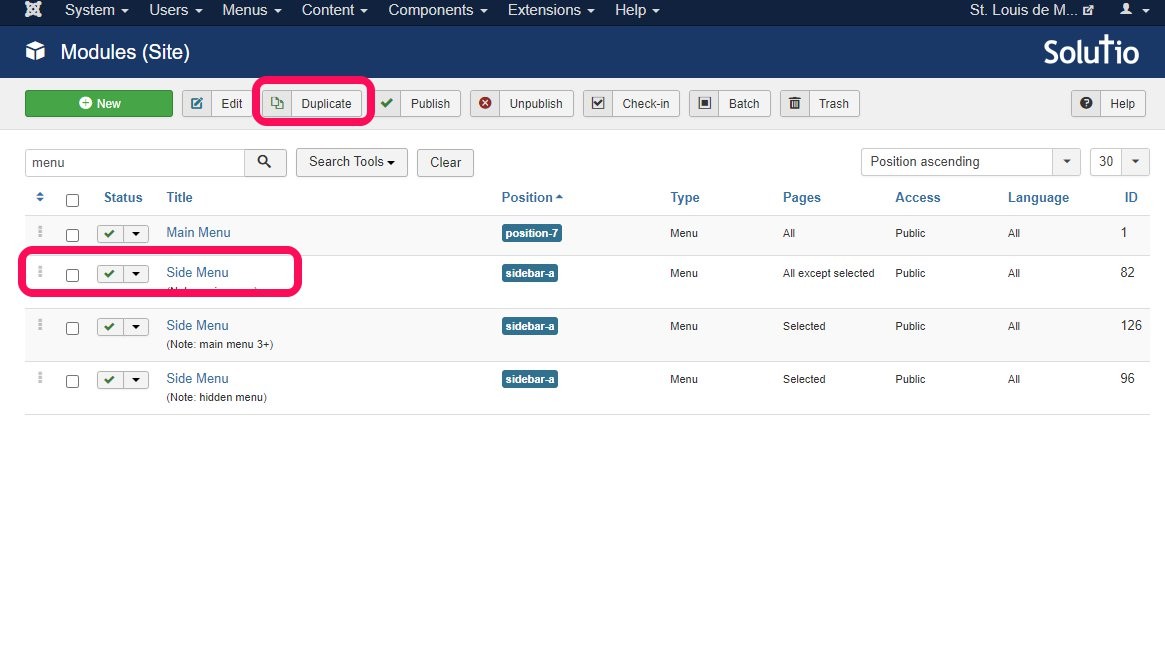
- Remove the position, assign to all pages, update the note to reflect new menu set - input the ID in the module instance particle in the site outline / base
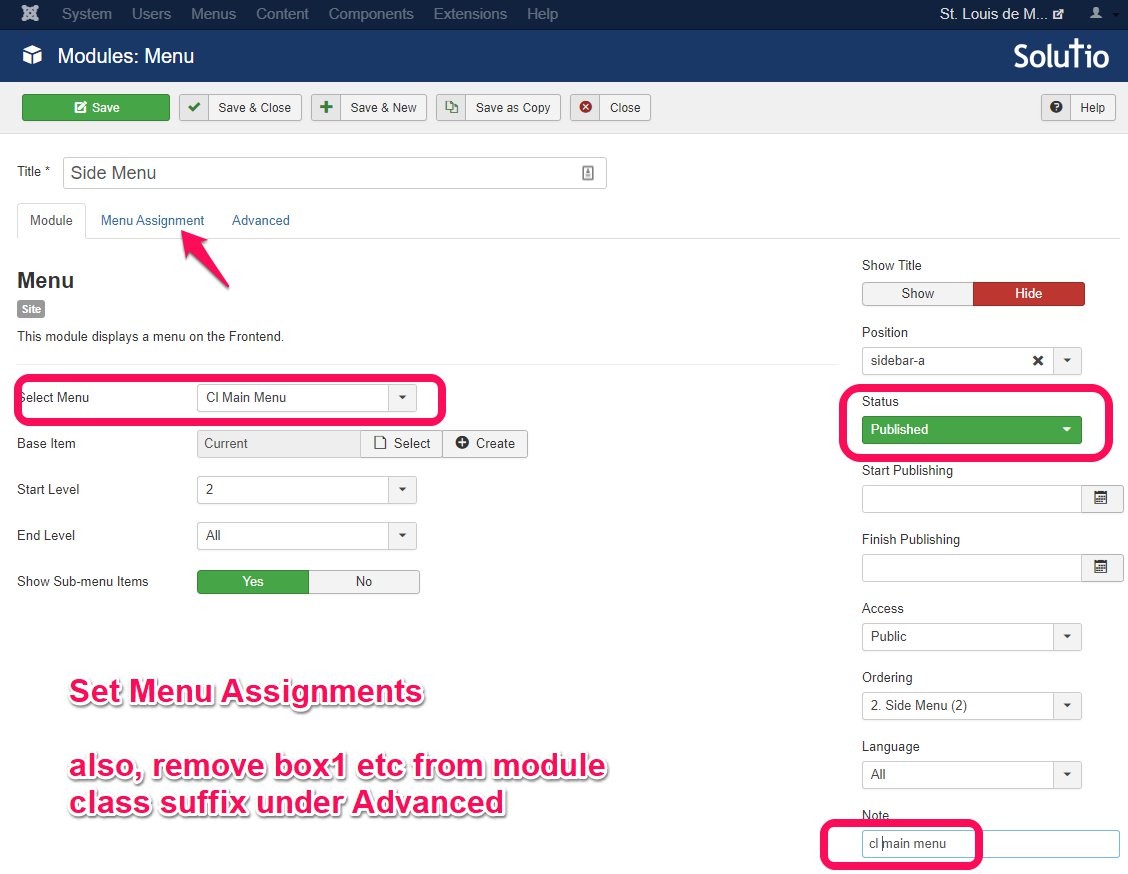
- Check the site to see that the side menu is actually appearing.
- If not launched yet, copy existing Side Menu for Main Menu
-
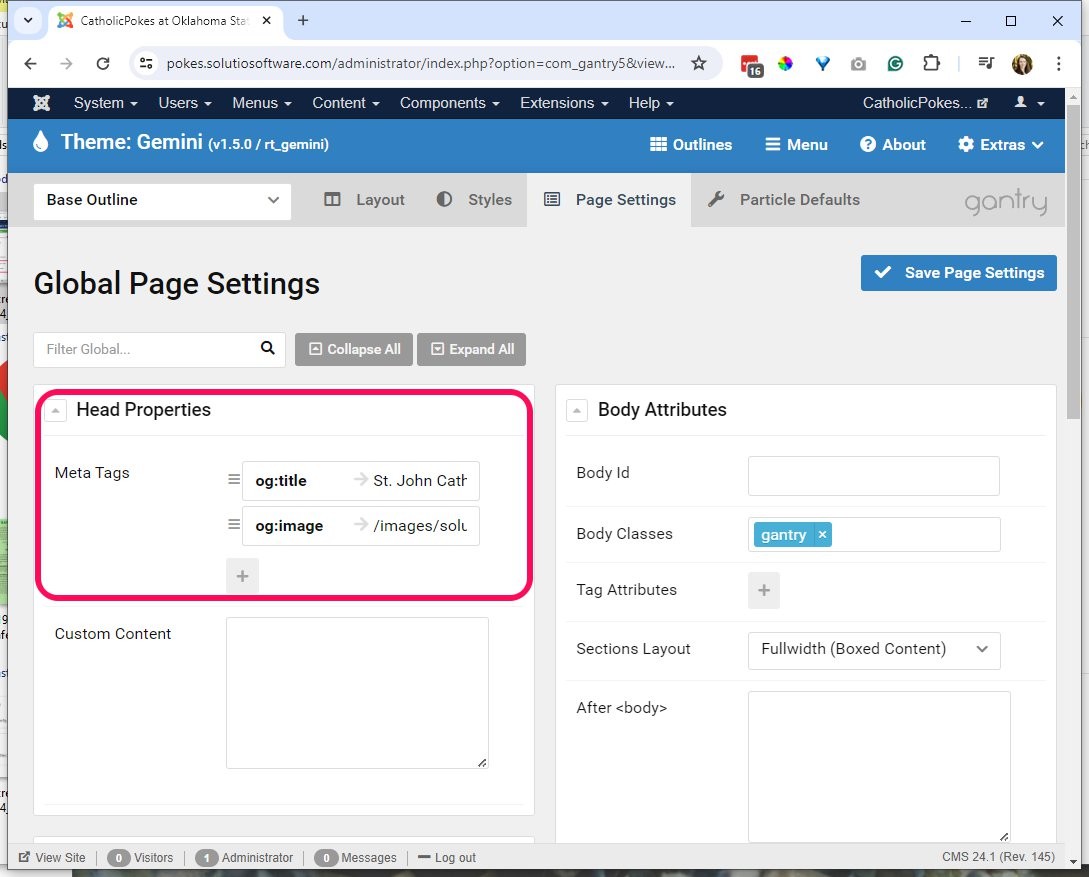
8. og:title and og:image
<meta property="og:title" content="St. John Catholic Student Center" /> <meta property="og:image" content="/images/solutio/new-church-2023.jpg" /> St. John Catholic Student Center
/images/solutio/new-church-2023.jpg"
-
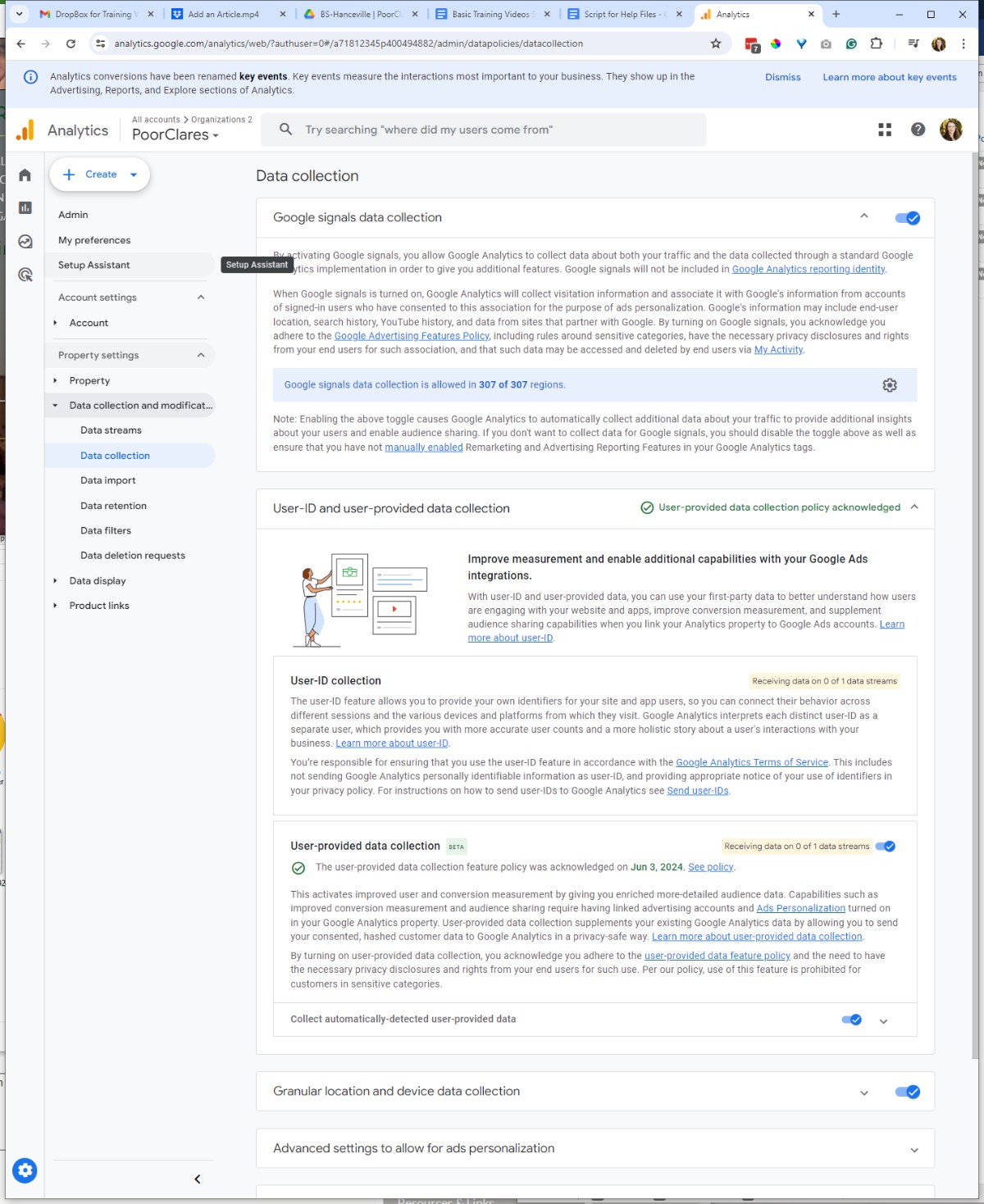
9. Activate Google Signals
Turn on the first, and the last (acknowledgment) setting in the property.
-
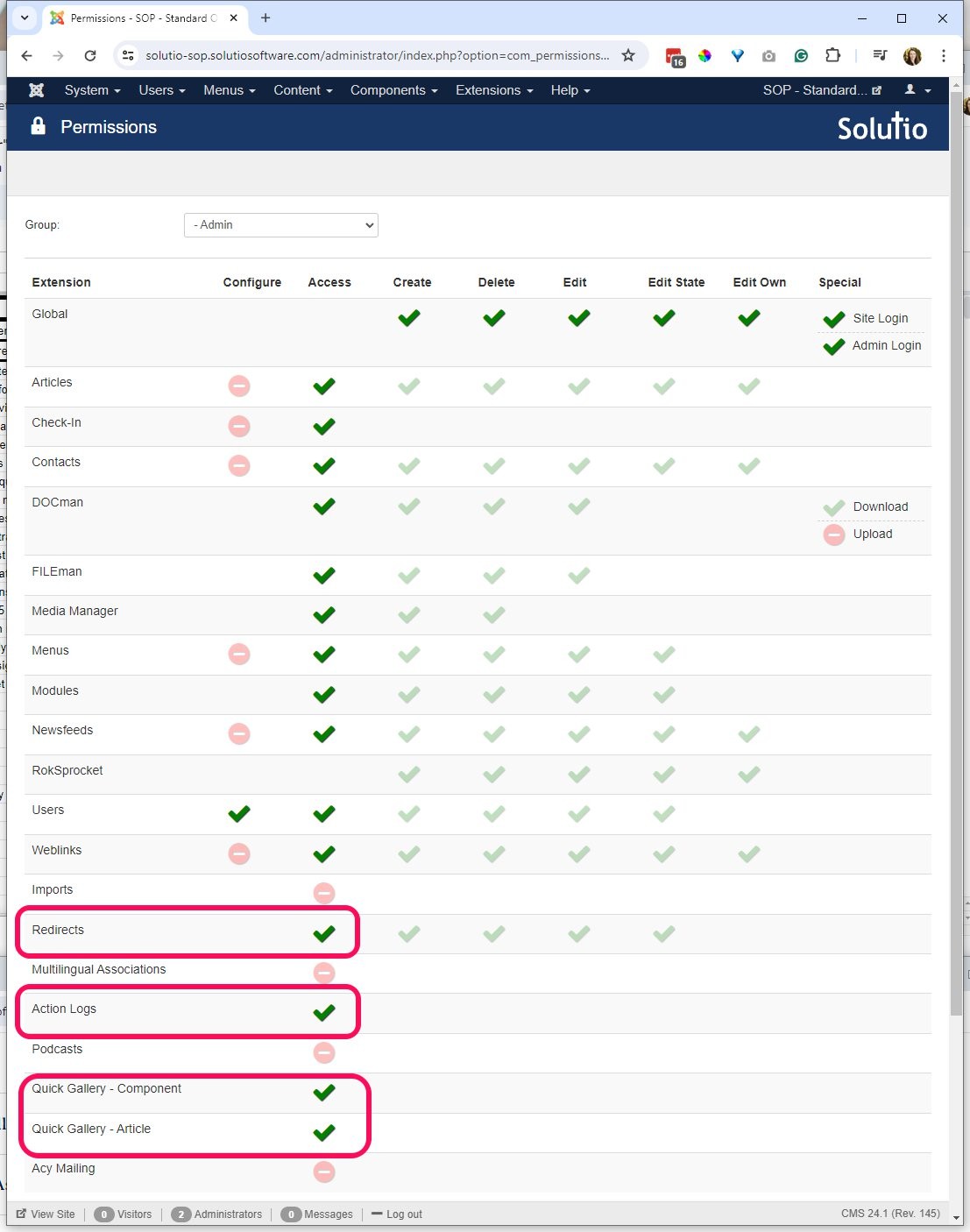
10. Give Admin permissions
-
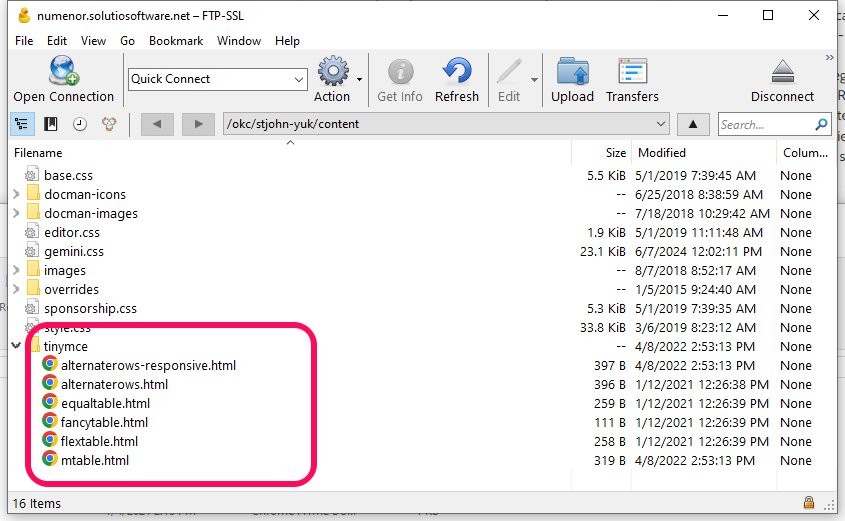
11. Check if TinyMCE templates are added
File path: Dropbox\Web\tinymce
The bilingual table should be listed first
- 1
Animate on Scroll
- Details
- Jeremy Meyer
Example:
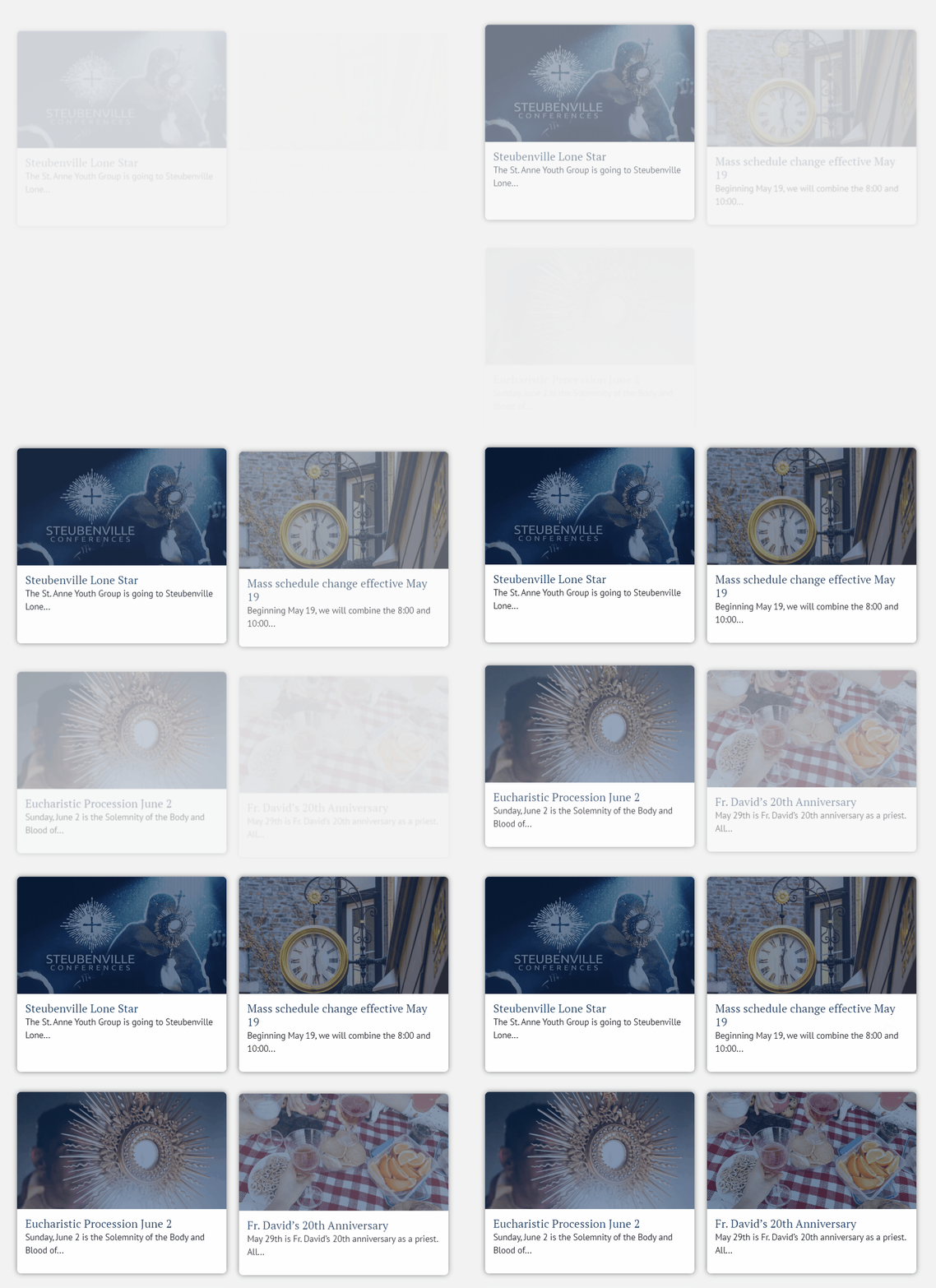
How to Set it Up
This currently only works with headlines.
requirements:
particle.js
particle.css
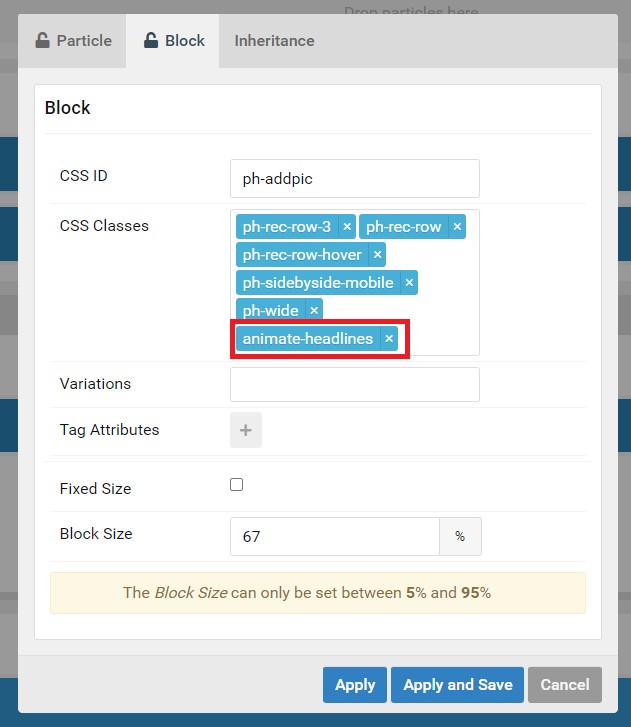
1. add the animate-headlines class to the headlines particle
animate-headlines
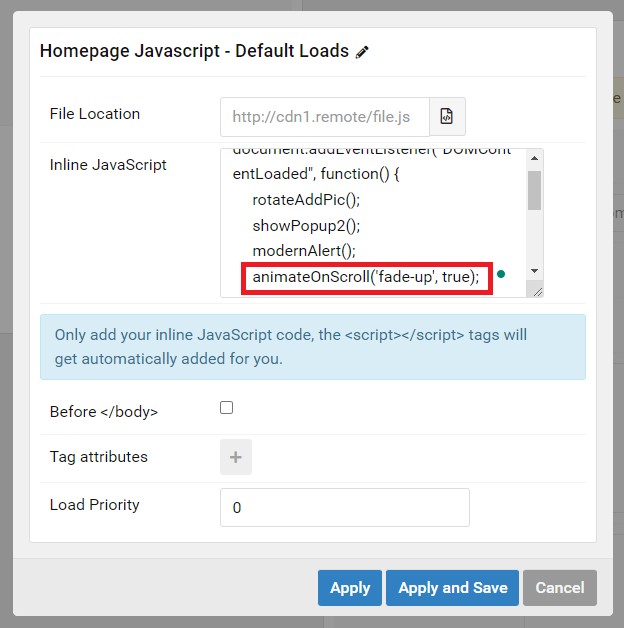
2. Add the Javascript to the outline and select which animation you want.
You can set the second parameter to false if you want the animation to play multiple times.
slide-in, fade-up, or zoom-in
animateOnScroll('fade-up', true);
Making new Animations
All the animations are managed in CSS. The javascript will add and remove the animation class depending on what is put in the function when it is called.
animateOnScroll('example-animation-class', true);
Here is an example of how an animation class is created.
Coding a new animation:
@keyframes example-animation-class {
from {
opacity: 0;
filter: blur(1px);
transform: translateY(30px);
}
to {
opacity: 1;
filter: blur(0);
transform: translateY(0px);
}
}
Tell the .g-grid what to do
.g-joomla-articles:has(.example-animation-class) > .g-grid:nth-child(1) {
animation: example-animation-class 1s ease-in-out 0ms forwards;
}
As you can see in the code this uses the :nth-child() selector because each child has a different delay applied so the animation is staggered. This is not required.
Add your new animation class to this selector in particle.css
div:has([class*="animate-"]) .g-joomla-articles > .g-grid:not(.hidden-element, .fade-up, .zoom-in, .slide-in, .example-animation-class) {
animation: show-element 750ms ease-in-out forwards;
}
This ensures that the paginated articles have a basic animation. The custom animation will not work when paginating to more articles.
Set the initial opacity of the class to 0
.fade-up, .zoom-in, .slide-in, .example-animation-class {
opacity: 0;
}
This hides it on page load. The animation being set to 'forward' is what ensures it keeps the ending styles of the keyframes animation.
if it is not set to forward the element will go back to opacity: 0;.
Redesign Projects
- Details
- Tori Schippers
New Team Member On Boarding
- Details
- Tori Schippers